Front-panel space is limited in 1U network equipment, where network ports, LED indicators, management interfaces, and control elements must all fit within a fixed height. When service personnel need access to more detailed device information than LEDs can provide, adding a display to the already constrained front panel becomes another design trade-off.
For applications where key information needs to be checked directly at the equipment, a local display can reduce the need to access a remote management interface simply to verify basic device status. In a 1U system, however, the display also occupies valuable front-panel space and introduces additional mechanical, electronic, and firmware integration requirements. Whether a local display is appropriate therefore depends on the actual use case and overall system design.
This article examines the practical value and design considerations of local displays in 1U network equipment, and discusses how PMOLED can provide a compact display option between basic LED status indication and a more comprehensive graphical HMI.
Why Provide More Information Locally on Network Equipment?
As the amount of information monitored and managed by network equipment increases, systems need to handle more than basic power and connection status. Network configuration, port status, temperature, fan operation, PoE status, alarms, and other operating information may also need to be monitored. LED indicators remain an effective way to check basic device status at a glance, while web management interfaces, command-line interfaces (CLI), and network management systems provide more comprehensive monitoring and configuration capabilities.
During installation, deployment, routine inspection, or troubleshooting, however, service personnel often do not need full management functionality as their first step. Instead, they may simply need to identify the device, check its current network settings, verify whether the system is operating normally, or determine what type of fault has occurred. If this information is available only through a remote management interface, personnel may first need to obtain the required access information and log in before they can verify the device status.
Some network devices incorporate a local display interface that provides device identification, system status, network information, or fault information directly on the equipment. Some products go further by integrating a touchscreen, allowing users to view information or perform selected operations directly from the front panel.
A local display is not intended to replace LED indicators or existing remote management systems. LEDs can provide quick indication of basic conditions, while a local display can present more specific device or fault information. Comprehensive configuration, monitoring, and management can remain within web interfaces, CLI, or network management systems.
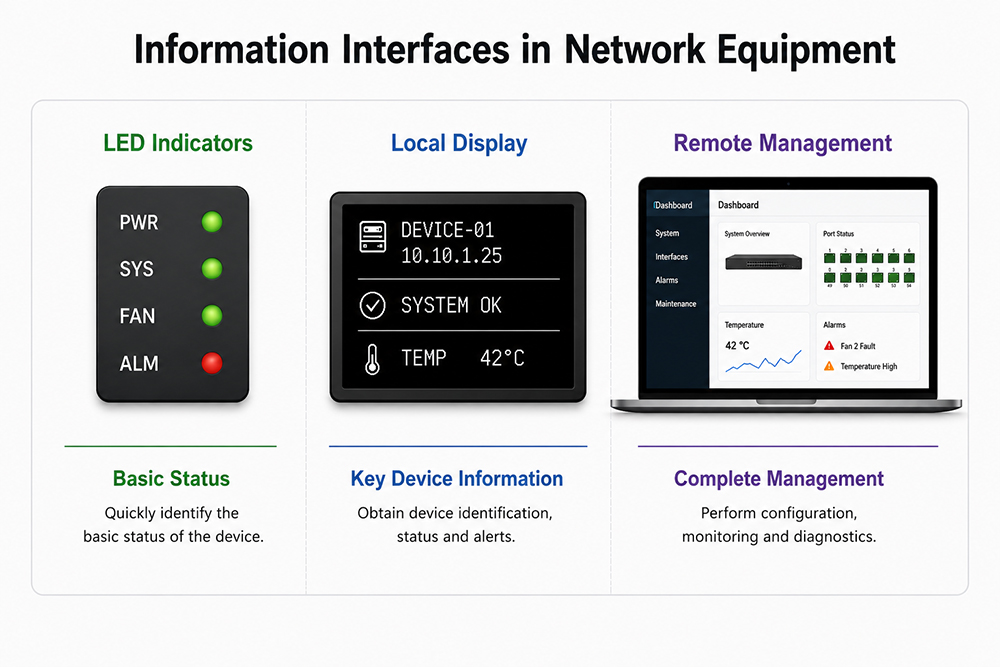
How Can a Local Display Support Device Identification, Deployment, and Maintenance?
In rack environments, multiple network devices with similar front-panel layouts may be installed close together, making it important for service personnel to quickly identify the device they are working on. A local display can show identification information such as the Hostname, Device ID, or management IP directly on the front panel, reducing the need to repeatedly check equipment labels or log in to a management system to confirm the device identity.
During deployment and configuration verification, a local display can also provide the IP address, network connection status, and other essential configuration information. This allows personnel to quickly confirm basic connectivity and configuration before proceeding with further setup or management tasks as needed.
Once the equipment is in normal operation, the local display can provide system and key component status. When a fault occurs, the display can provide more specific information than an LED alarm alone, such as identifying a fan fault, an overtemperature condition, or an abnormal port status. This helps service personnel determine the likely source of the problem before using the management system for more detailed diagnostics and troubleshooting.
A local display makes key information for device identification, deployment, status verification, and initial fault assessment more readily available at the equipment. Service personnel can first check essential information directly from the front panel and then determine whether further access to the management system is required.
Why Are Local Displays Still Uncommon in 1U Network Equipment?
Although a local display can provide more direct access to device information, integrating one into 1U network equipment requires consideration of the overall system design. A standard 1U rack unit is only 44.45 mm high, while the front panel of a network switch may already contain a large number of RJ45, SFP, or other network ports, along with LEDs, management interfaces, and control elements. For equipment designed around high port density, allocating limited front-panel space to a display becomes an important design trade-off.
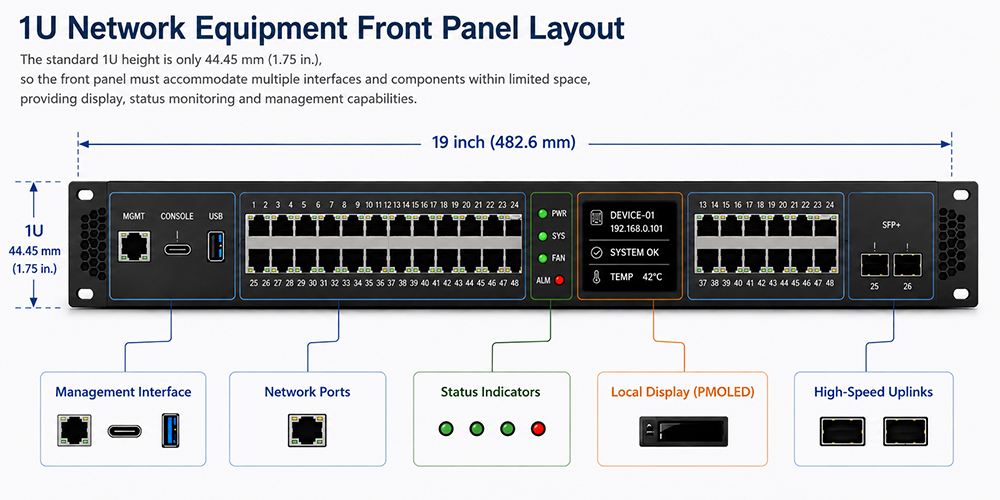
Adding a display also involves more than installing a display module. Mechanical layout, host interface design, firmware control, and display content planning all become part of the system integration process. For network equipment designed for continuous operation, display operation, power management, and long-term operating conditions must also be considered. If basic device status can be adequately indicated by LEDs and on-site interaction is infrequent, the need for a local display may be limited.
Some 1U network devices already integrate compact displays within the available front-panel space to provide local device information. This demonstrates that the 1U height constraint does not necessarily prevent display integration. The more important question is whether the application has a sufficient need for local information and whether the functionality provided by the display justifies the required front-panel space and system resources.
A local display is not a standard requirement for every 1U network device. Where more local information is needed, the display design must balance information requirements with front-panel space and system integration constraints.
How Does PMOLED Address Local Display Requirements in 1U Network Equipment?
For 1U network equipment that requires local information display but does not need a complex graphical interface or touch operation, a compact monochrome PMOLED can provide a streamlined display solution. PMOLEDs are well suited for presenting text, numerical values, and icons for device identification, network information, system status, and basic diagnostics, allowing the limited display area to focus on information that service personnel need to access quickly.
PMOLEDs are self-emissive and do not require a separate backlight, which helps simplify the display structure and supports a thinner module design. This provides greater integration flexibility for front-panel designs with limited installation space. Their high contrast improves the readability of text and status information, while wide viewing angles are useful in rack environments where the display may be viewed from different positions.
PMOLED can serve as an intermediate display option between basic LED status indication and a more comprehensive graphical HMI, particularly when 1U network equipment needs to provide more local information than LEDs can convey without requiring a color GUI or touch operation.
What Information Should a 1U PMOLED Local Display Show?
With the limited display area available in 1U network equipment, the goal of a local display is not to show as much information as possible, but to make the most relevant information quickly accessible to service personnel. Display content can be prioritized according to device identification, basic operating status, and fault diagnostics, including information such as the Hostname, management IP, system status, temperature, fan status, port status, and alarms that may require on-site attention.
Not all information needs to appear on a single screen. For compact PMOLEDs with limited resolution, content can be organized across multiple pages according to information type. For example, the main screen may show the Hostname, IP address, and overall system status, while additional pages provide temperature, fan, or port information. Pages can be switched using physical buttons, or the system can automatically change or update the displayed content according to device status. This helps prevent excessive information from reducing readability within the limited display area.
Display priorities can also change according to the operating condition of the equipment. During normal operation, device identification and basic status can take priority. If a temperature, fan, or network fault occurs, the relevant alarm or fault information can take priority, allowing service personnel to identify the likely issue before accessing the management system for more detailed diagnostics.
Information planning for a 1U PMOLED should focus on the on-site use case, information priority, and readability. Rather than filling the limited display area with large amounts of information, the objective is to ensure that users can quickly find the information that is most useful at the time.
PMOLED Selection and Integration Considerations for 1U Equipment
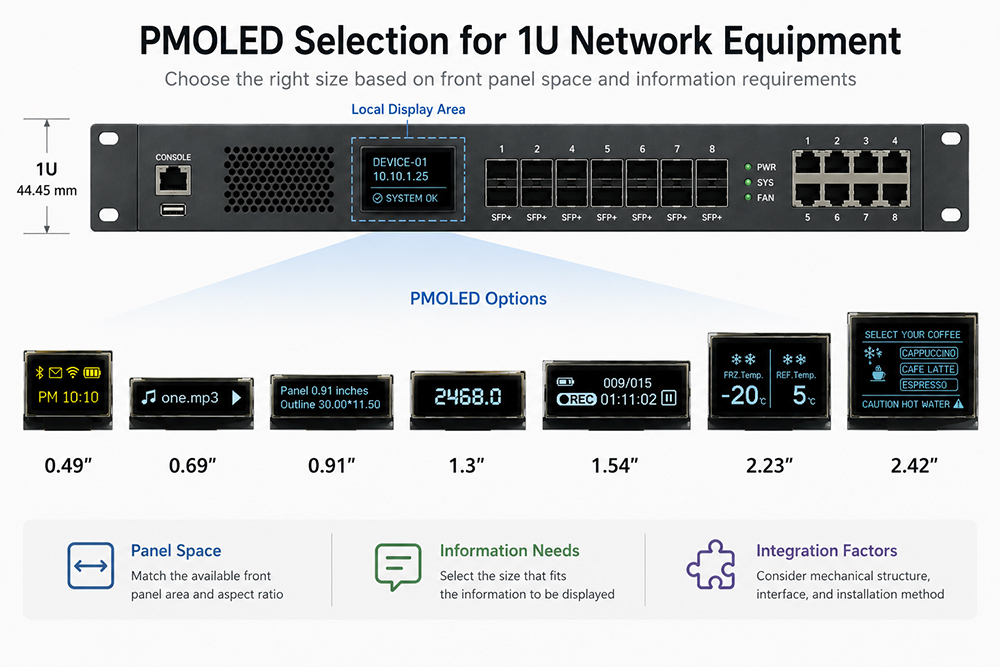
Once the local display content has been defined, PMOLED selection can be evaluated based on available front-panel space, the amount of information to be displayed, resolution, communication interface, and mechanical integration requirements. For 1U equipment, a larger display is not necessarily a better choice. The display size should balance information readability with the limited space available on the front panel.
The amount of information, text size, icon requirements, and whether multiple items need to be shown simultaneously all influence the required display size and resolution. While display area and resolution determine how much information can be presented and how the interface can be arranged, the actual readability of text and icons must also be considered within the available 1U front-panel space. Display selection should therefore begin with the information and readability requirements rather than simply choosing the largest display that can physically fit.
Electronic and mechanical integration should also account for the host system's available communication interfaces, PCB or FPC configuration, module dimensions, installation depth, and front-panel cutout. In addition to confirming that the active display area meets the application requirements, the complete module outline, connection method, and space required for surrounding components should be included in the mechanical design. WINSTAR PMOLED modules are available in a range of sizes, resolutions, module structures, and interface options to support different host platforms and equipment design requirements.
When integrating a local display into 1U network equipment, the key question is not simply whether a display can fit on the front panel, but whether the application has a sufficient need for on-site information and whether the display can provide practical value within the available space and system resources. When only basic status indication is required, LEDs remain a simple and effective solution. When service personnel need direct access to device identification, network status, or fault information without requiring a full graphical HMI or touch operation, a compact PMOLED provides another design option.
Related Reading
For 2U server applications, see PMOLED Applications and Design for 2U Server Local Monitoring Interfaces.