

The OLED COB Character Module Does Not Work – How to Make It Functional
Problem Description:
WINSTAR OLED COB character modules are designed based on the 6800-series microprocessor interface.
If the module does not display or respond after power-on, please check the following items step by step.
1. Verify 6800 Interface Timing
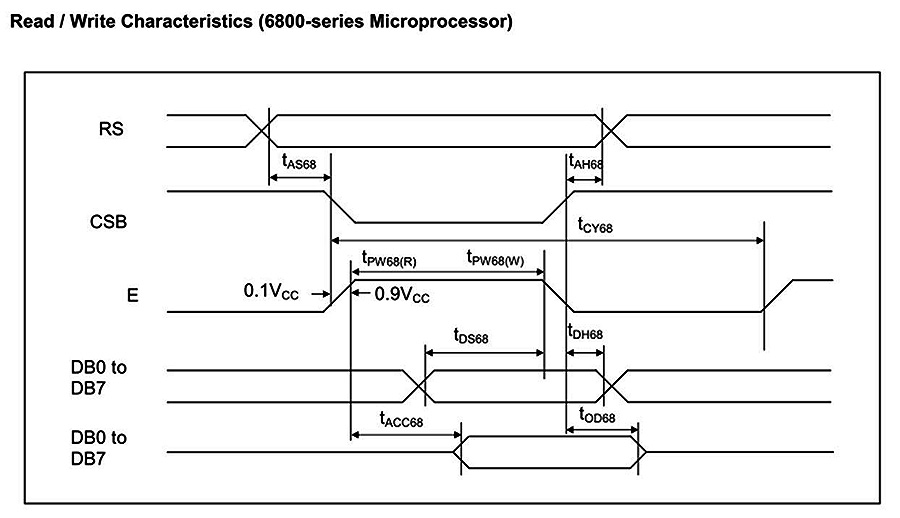
Timing mismatch is the most common cause of OLED character modules not functioning properly.
Please ensure that the timing configuration of your MCU complies with the datasheet specifications for the 6800 interface.
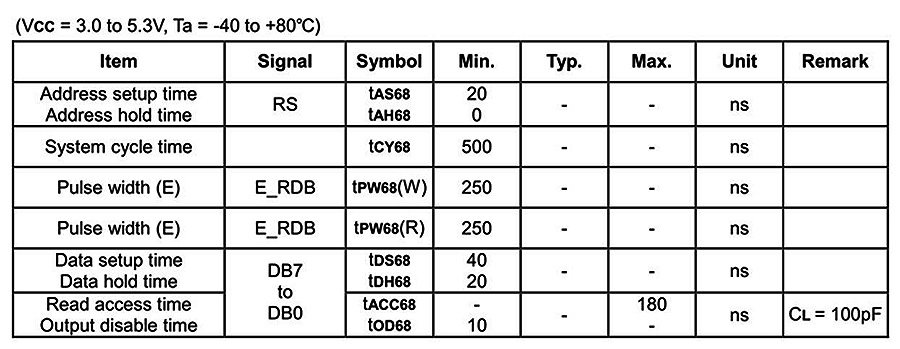
Key parameters to verify include:
- Enable (E) pulse width for read and write operations
- Data setup and hold time on DB0–DB7
- Read access time (tACC)
If the Enable pulse is too short or data is not stable during the valid window, commands or data may not be correctly latched by the controller.
Fig1: Character type 6800 Timing diagram.
2. Check Hardware Connections
Even with correct timing, improper wiring or unstable signals may prevent normal operation.
Please confirm that:
- RS, R/W, E, and CS signals are connected to the correct MCU pins
- Data bus lines (DB0–DB7) are not swapped, floating, or shorted
- VCC and GND are within the specified operating voltage range
- Signal levels meet logic high/low requirements
- Reset signal (if applicable) is applied correctly during power-on
Incorrect signal mapping or unstable power may result in no display or abnormal behavior.
Fig. 2: Write/Read timing
3. Confirm Initialization Sequence
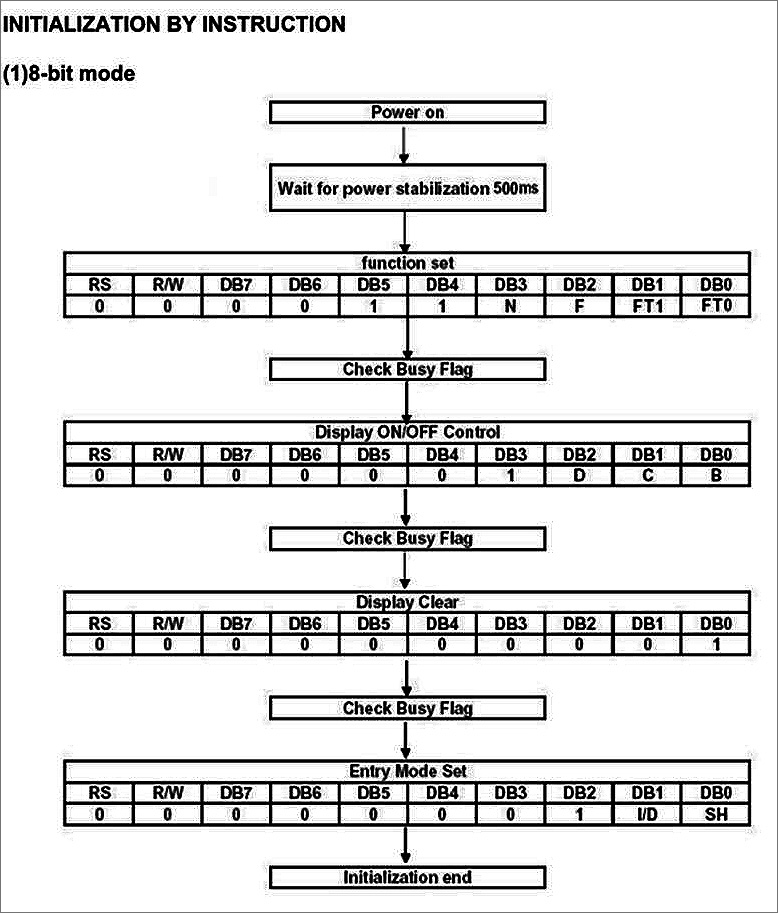
The OLED COB character module will not operate correctly unless the initialization sequence is executed completely and in the correct order.
A typical initialization flow includes:
- Power on and wait at least 500 ms for power stabilization
- Send Function Set command
- Check Busy Flag
- Send Display ON/OFF Control command
- Check Busy Flag
- Send Display Clear command
- Check Busy Flag
- Send Entry Mode Set command
Each command must be issued only after the Busy Flag is cleared.
Skipping steps or shortening delays may cause the display to remain blank or behave unpredictably.
Fig. 3: Initial steps
If the OLED COB character module does not work after power-on:
1. Verify 6800 interface timing
2. Check hardware wiring and signal integrity
3. Execute the complete initialization sequence
Strict adherence to these requirements is essential for proper operation.


