Design Better EV Charger HMIs with the Right Display, Touch, and System Integration Strategy
The HMI is where users interact with an EV charging station. Whether checking charging progress, following on-screen instructions, making a payment, or responding to system notifications, nearly every user interaction takes place through the display. As EV charging infrastructure continues to evolve, the display has become far more than an information panel—it plays a central role in usability, operational efficiency, and the overall charging experience.
Choosing the right display is no longer simply a matter of screen size or resolution. Engineers must also consider readability under varying lighting conditions, touch performance, system integration, long-term reliability, and future scalability. Evaluating these factors together helps create an intuitive HMI that delivers a consistent user experience while supporting stable, long-term operation.
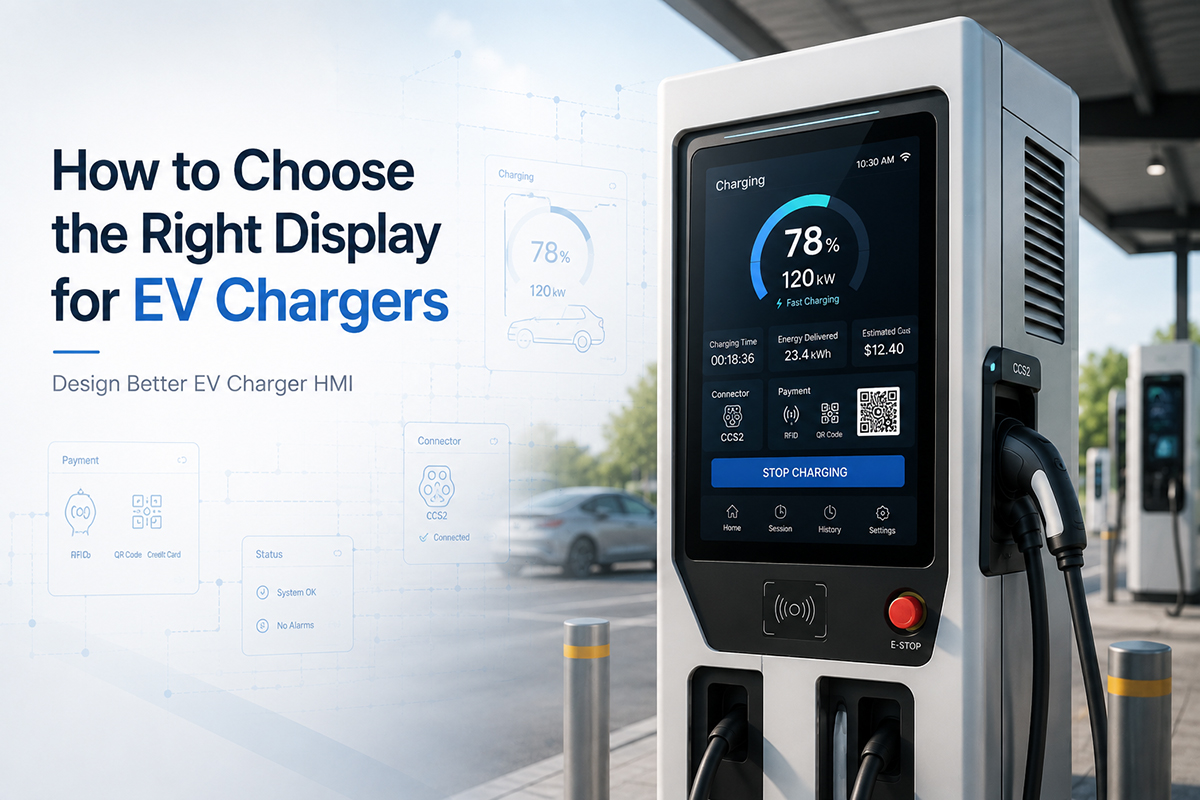
This guide explores the key considerations for designing an EV charger HMI, from display selection and touch integration to environmental visibility, system architecture, and long-term reliability. It also highlights how WINSTAR's TFT displays and Smart Display solutions help developers build intuitive, reliable, and scalable HMIs for a wide range of EV charging applications.
In This Guide
Why EV Charger HMI Design Starts with Display Selection
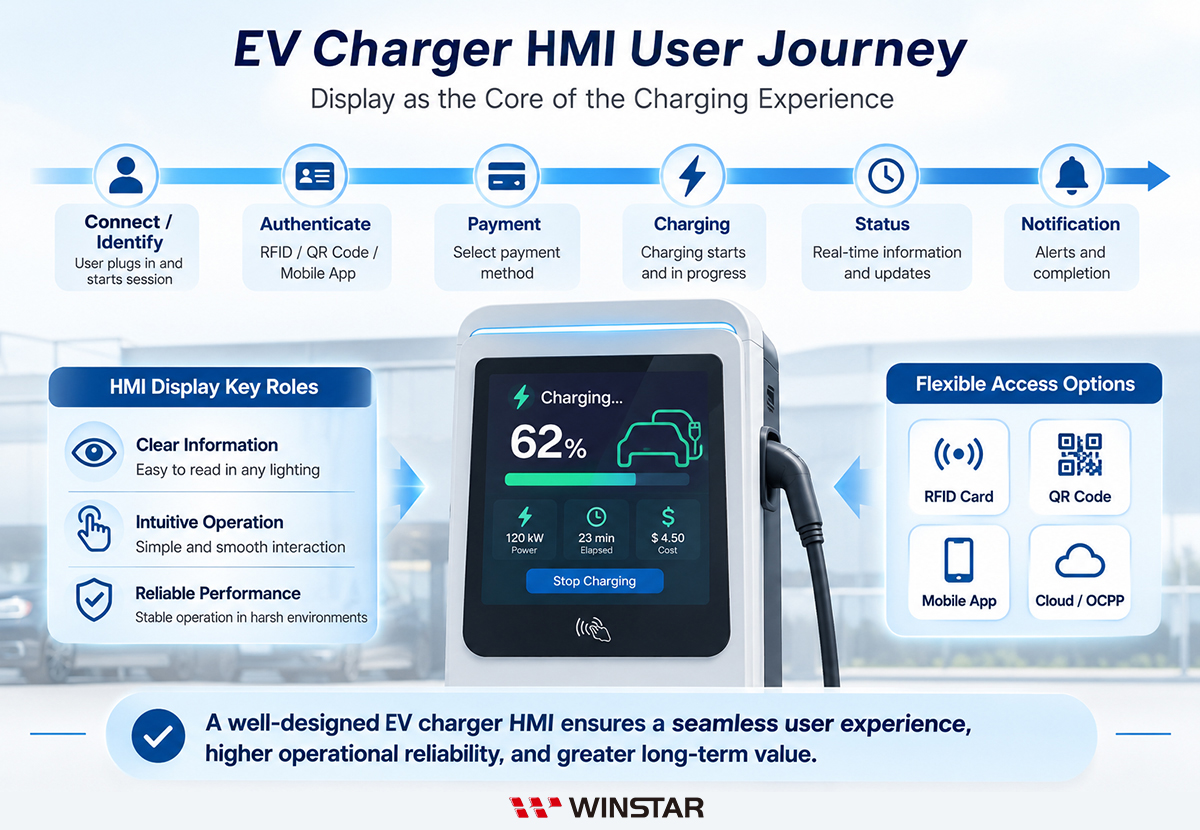
An EV charger HMI must support every stage of the charging process, from user authentication and connector guidance to charging configuration, payment, real-time status updates, and system notifications. As charging stations continue to evolve, many now integrate membership services, QR code payments, RFID authentication, dynamic pricing, and digital advertising. These additional functions increase both the amount of information displayed and the complexity of user interactions. As a result, display selection has become a fundamental part of HMI design, influencing UI layout, system architecture, and the overall user experience from the earliest stages of product development.
The operating environment also plays a critical role in display selection. EV chargers may be installed in indoor parking facilities, covered charging areas, or fully exposed public charging stations, each presenting different lighting conditions, temperatures, humidity levels, and user interaction scenarios. A well-designed HMI should remain easy to read in both daylight and at night, while the touch interface must continue to perform reliably in challenging conditions such as rain, glove operation, and frequent daily use. Addressing these requirements early in development helps avoid costly redesigns involving cover glass, backlight performance, touch tuning, or mechanical integration.
Display technology also affects the complexity of system integration and future product scalability. Whether using a standard TFT display, a Smart Display, or another HMI architecture, the optimal solution depends on factors such as processor capability, GUI development resources, communication interfaces, and project timelines. Rather than selecting a display based on interface compatibility or hardware specifications alone, developers should evaluate UI requirements, system architecture, operating conditions, and product lifecycle as a complete design strategy. Taking this holistic approach reduces integration risks and provides greater flexibility for future feature upgrades and product variants.
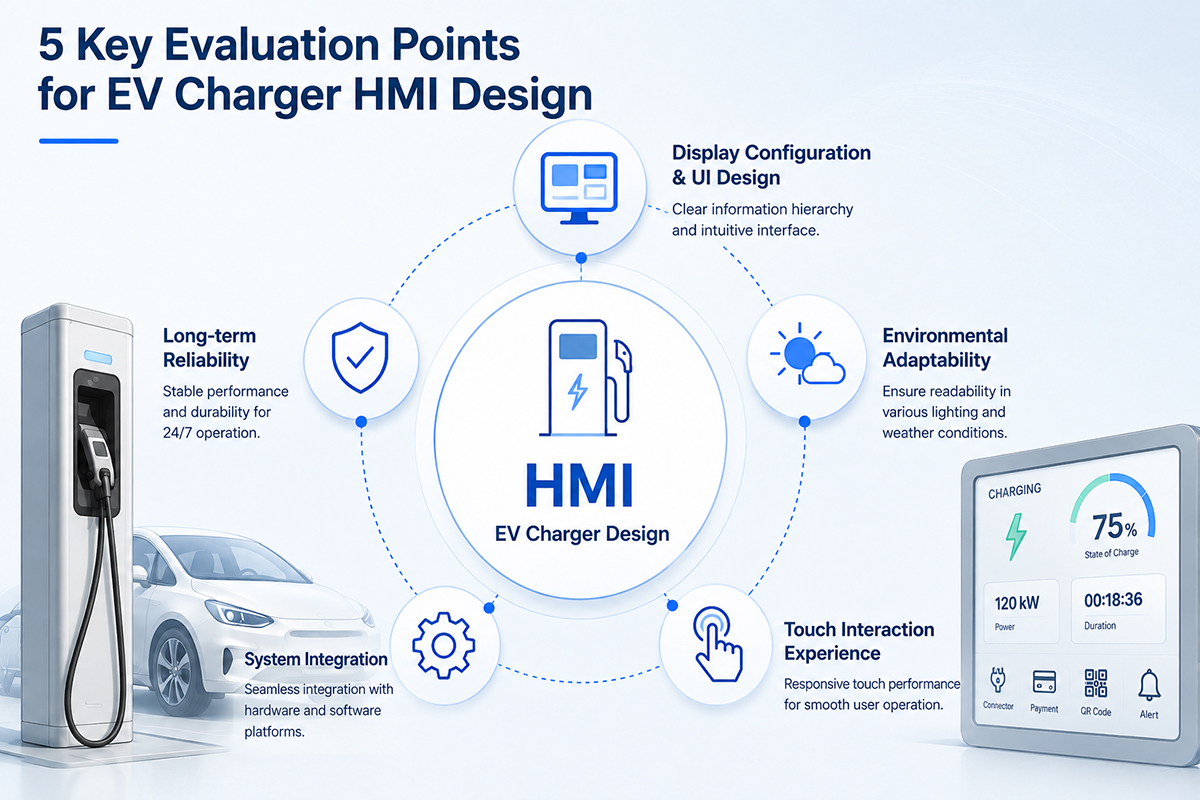
Five Key Considerations for EV Charger HMI Design
1. Display Size, Resolution, and UI Design
Display size and resolution should be determined by the HMI's user interface and workflow rather than the available space on the front panel alone. Before selecting a display, developers should define what information must remain visible at all times, what content can be organized into multiple screens, and whether a single interface needs to accommodate charging status, control buttons, QR codes, payment instructions, or system notifications. These requirements ultimately determine the display size, resolution, and screen layout needed for an effective user experience.
Other design considerations include viewing distance, font and icon readability, touch target size, aspect ratio, mechanical constraints, and multilingual interface requirements. A larger display or higher resolution does not automatically result in a better HMI. Without a well-planned UI, increasing screen size may add development complexity, require greater processing power, increase energy consumption, and raise GUI development costs without improving usability.
Key Considerations for Display Size and Resolution
| Design Consideration |
What to Evaluate |
| HMI Functions and Information Density |
Determine the required display area and resolution based on the amount of information presented on each screen, including payment, QR codes, membership services, dynamic pricing, advertising, and multilingual interfaces. |
| UI Hierarchy and Screen Layout |
Prioritize charging status, pricing, alerts, and control buttons with a clear visual hierarchy to maintain readability and reduce screen clutter. |
| Viewing Distance |
Ensure that text, icons, and numerical information remain easy to read at the expected viewing distance while considering installation height and user viewing angle. |
| Touch Interface Layout |
Provide sufficient space for touch buttons, input fields, and confirmation messages to minimize accidental touches and improve usability. |
| Mechanical Design and Aspect Ratio |
Select a display size, aspect ratio, mounting method, and connector location that fit the charger enclosure and overall mechanical design. |
| Resolution and System Resources |
Choose a resolution that supports fonts, graphics, QR codes, and multilingual interfaces while matching processor performance, GUI resources, and graphics capabilities. |
Display requirements also vary depending on the intended HMI functionality. A basic charging interface may only need to present charging status, energy consumption, and pricing information. More advanced systems that incorporate touch interaction, QR code payments, or user authentication require additional screen space for interactive controls and user guidance. When integrating features such as membership services, dynamic pricing, digital advertising, maps, or multilingual content, developers should also verify that the processor and GUI framework provide sufficient performance to support the desired user experience.
Choosing the right display is about more than screen size or pixel count. The optimal solution should balance UI design, workflow, mechanical constraints, and available system resources to create an HMI that is both intuitive and scalable.
2. Environmental Adaptability and HMI Visibility
EV chargers are deployed in a wide range of environments, including indoor parking facilities, covered charging areas, and fully exposed public charging stations. Each installation presents different lighting conditions, viewing angles, temperatures, and levels of surface reflection. A well-designed HMI should remain easy to read in bright daylight while avoiding excessive brightness that can cause glare or visual discomfort at night. Consistent visibility is essential for displaying charging status, payment information, user instructions, and system notifications under all operating conditions.
For this reason, display visibility should not be evaluated based on peak brightness alone. Engineers should also consider ambient lighting, display contrast, viewing angle, cover glass, surface reflections, optical enhancements, backlight control, and UI design. Optimizing these elements together creates an HMI that remains comfortable to read and easy to operate throughout the day.
Display Design Considerations for Different Lighting Conditions
| Operating Environment |
Common Challenges |
Design Considerations |
| Indoor or Low-Light Environments |
Excessive screen brightness may cause glare and visual fatigue, especially in underground parking garages or during nighttime operation. |
Evaluate the minimum brightness level, backlight dimming range, dark-mode UI, and nighttime color schemes. |
| Semi-Outdoor Installations |
Ambient lighting changes throughout the day, making a fixed brightness setting unsuitable for all conditions. |
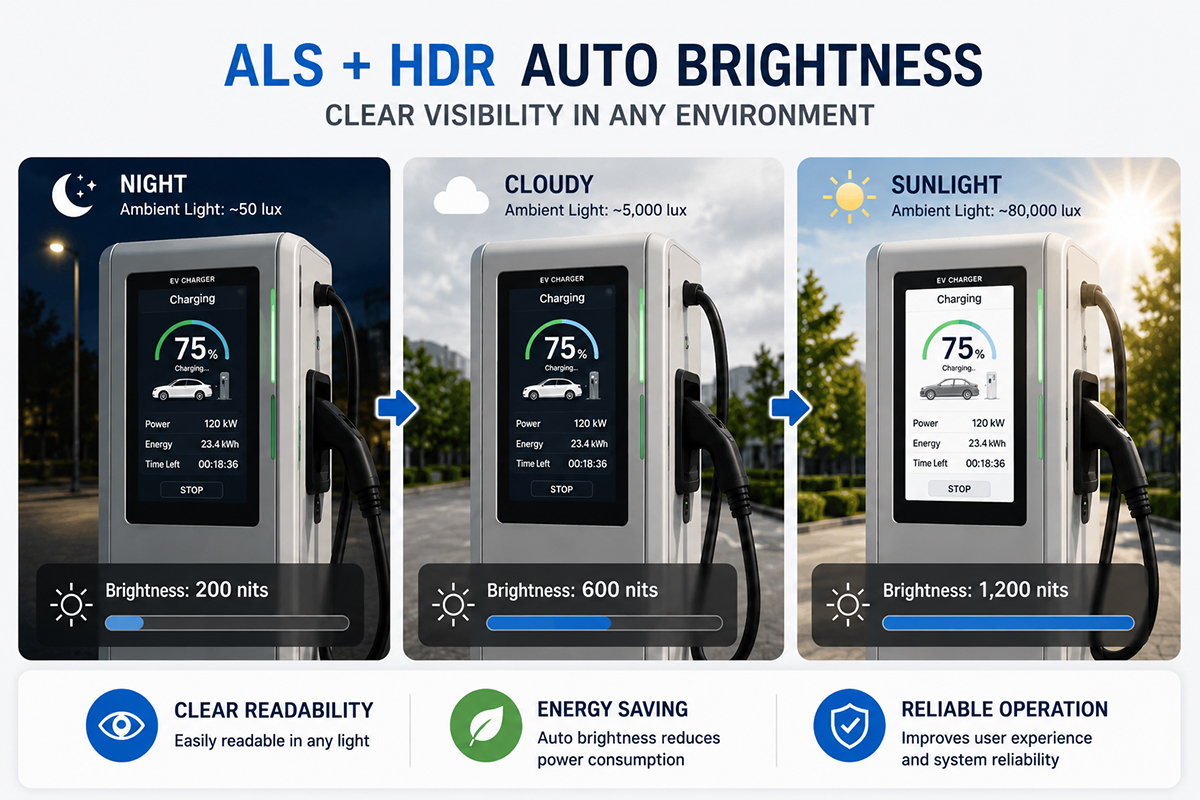
Use an Ambient Light Sensor (ALS) with automatic brightness control and define separate brightness profiles for daytime and nighttime operation. |
| Direct Sunlight or High Ambient Light |
Reflections and strong ambient light reduce image contrast, limiting readability even at high brightness levels. |
Consider display brightness together with AG, AR, Optical Bonding, cover glass transmittance, thermal management, and power consumption. |
| Multiple Viewing Positions |
Different viewing angles may cause color shift or reduced contrast. |
Evaluate IPS technology, installation angle, mounting height, and front panel orientation to maintain a consistent viewing experience. |
Ambient Light Sensing and Intelligent Brightness Control
Maintaining a fixed backlight brightness is rarely the best solution for EV chargers that operate around the clock. A display that appears too dim during the day may become difficult to read, while excessive brightness at night can create glare and reduce user comfort.
By integrating an Ambient Light Sensor (ALS), the HMI can automatically adjust TFT backlight brightness according to surrounding light conditions. Whether brightness control is managed by the host MCU or a Smart Display, automatic adjustment helps maintain readability during the day while reducing unnecessary brightness, power consumption, and thermal stress at night.
Brightness control becomes even more effective when combined with thoughtful UI design. Features such as day and night display modes, optimized color palettes, improved text contrast, and adaptive interface layouts help deliver a consistent user experience across changing lighting conditions.
To prevent distracting brightness fluctuations, the control algorithm should avoid responding to every instantaneous change in ambient light. Techniques such as brightness zones, response delays, averaging, and hysteresis help produce smooth transitions while minimizing unnecessary adjustments caused by vehicle headlights, shadows, or other temporary light sources.
Optical Technologies for Better HMI Visibility
In addition to intelligent brightness control, several display technologies can further improve HMI visibility in demanding environments:
- IPS Wide Viewing Angle: Maintains consistent color reproduction and contrast across a wide range of viewing angles, making the interface easier to read for different users.
- Anti-Glare (AG): Reduces glare caused by ambient light while preserving image clarity.
- Anti-Reflective (AR): Minimizes reflections from the cover glass to improve readability in bright environments.
- Optical Bonding: Reduces internal reflections between the display and cover glass, improving contrast and outdoor readability.
Designing an HMI for consistent visibility requires more than selecting a high-brightness display. Intelligent backlight control, optical enhancements, and well-designed UI elements work together to deliver a comfortable, reliable user experience across a wide range of operating environments.
3. Touch Interaction and User Experience
Touchscreens have become the primary interface for modern EV chargers, enabling users to start and stop charging, authenticate their identity, complete payments, monitor charging progress, and respond to system notifications. As charger functionality continues to expand, touch interaction has become a key element of HMI design. Creating a responsive and intuitive interface requires more than selecting the right touch technology—it also involves thoughtful workflow design, interface layout, and adaptation to real-world operating environments.
A well-designed HMI should enable users to complete each step quickly and confidently while minimizing operating errors. In addition to touch responsiveness, developers should consider button size, interface layout, user flow, confirmation mechanisms, glove operation, and outdoor usability. Optimizing these elements together creates a consistent and reliable user experience across a wide range of charging scenarios.
Public EV chargers are also exposed to demanding operating conditions, including rain, dust, temperature fluctuations, and frequent daily use. For these applications, the touch interface must deliver not only accurate touch performance but also the durability and long-term reliability required to reduce maintenance costs and ensure dependable operation.
Key Considerations for Touch Interface Design
| Design Consideration |
What to Evaluate |
| User Feedback |
Provide immediate visual feedback through screen transitions, progress indicators, animations, or status messages to confirm that user actions have been successfully registered. |
| User Workflow |
Minimize the number of interaction steps for common functions, and include confirmation dialogs for critical operations such as stopping charging or canceling a payment. |
| Interface Layout |
Design touch targets with appropriate size, spacing, and placement to improve usability and reduce accidental touches in outdoor environments. |
| Touch Technology |
Evaluate whether Projected Capacitive Touch (PCAP) provides the responsiveness, accuracy, and multi-touch capability required for the application. |
| Glove Operation |
Consider glove touch support when users may operate the charger while wearing work gloves or winter gloves. |
| Wet Conditions |
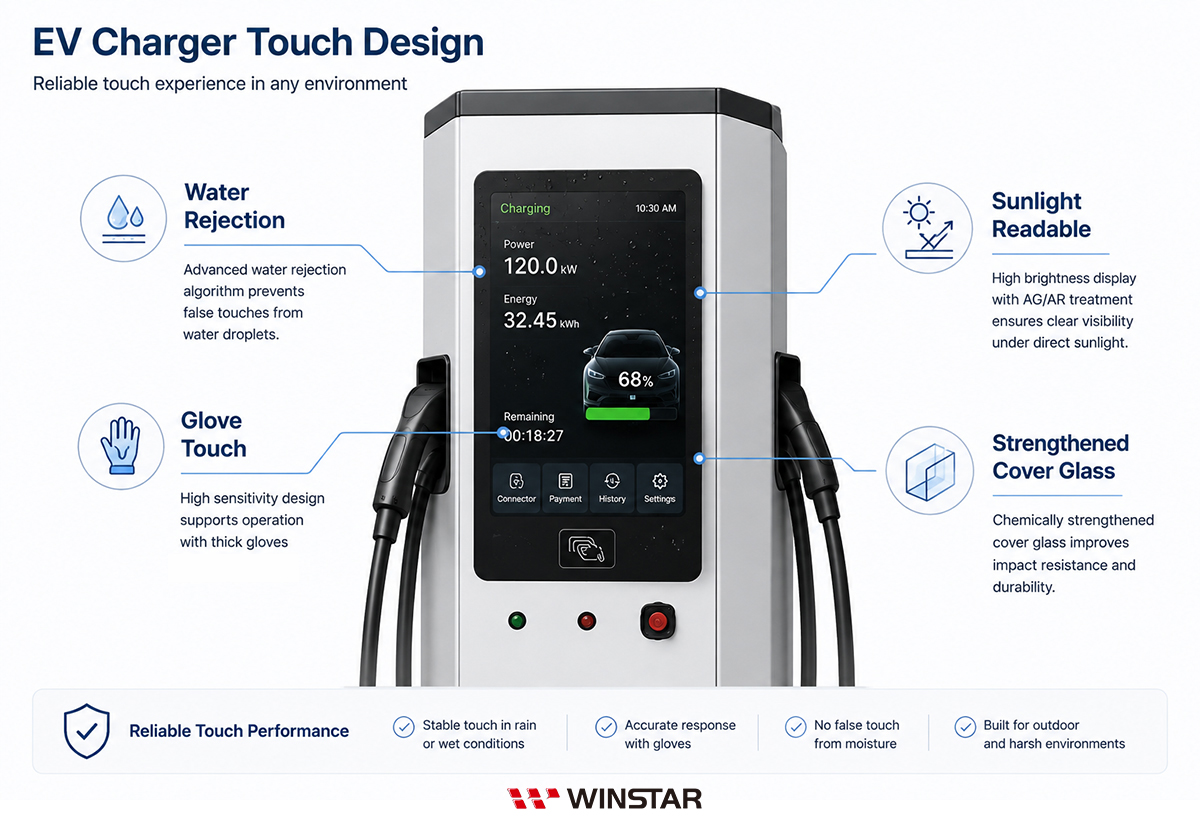
In outdoor environments, evaluate touch controllers with Water Rejection technology to reduce false touches caused by rain or water droplets. |
| Surface Durability |
Consider chemically strengthened cover glass to improve scratch resistance, impact resistance, and long-term durability for public charging applications. |
Touch interface requirements vary depending on installation environments, target users, and charger functionality. Rather than focusing solely on touch specifications, developers should evaluate user workflow, interface design, touch technology, and environmental conditions as an integrated HMI design strategy.
Technologies That Enhance the HMI Experience
Depending on application requirements, the following technologies can further improve usability, reliability, and long-term performance:
- Projected Capacitive Touch (PCAP): Provides fast, accurate, and intuitive multi-touch interaction for modern HMI applications.
- Glove Touch: Enables reliable operation while wearing work gloves or winter gloves in industrial and outdoor environments.
- Water Rejection: Reduces false touches caused by rain or water droplets, improving touch reliability in wet operating conditions.(Learn more)
- Chemically Strengthened Cover Glass: Improves scratch resistance, impact resistance, and long-term durability for high-traffic public charging stations.
An effective EV charger HMI depends on more than touch performance alone. By combining intuitive interface design, appropriate touch technologies, and environmental adaptability, developers can create charging experiences that are efficient, reliable, and consistent across a wide range of operating conditions.
4. HMI System Architecture and Integration
Modern EV chargers integrate far more than charging control. Payment systems, user authentication, communication modules, cloud connectivity, and the Human-Machine Interface (HMI) must all work together as a unified system. As a result, the display is no longer just an output device—it has become an integral part of the overall system architecture, interacting closely with the host processor, touch interface, GUI, and backend services. The chosen HMI architecture directly influences development efficiency, system reliability, and the ability to expand future functionality.
When designing an HMI system, developers should evaluate more than display interfaces alone. Processor performance, GUI development resources, software architecture, and long-term product planning all play important roles in selecting the most appropriate solution. These architectural decisions affect hardware design, software development, product maintenance, and future platform scalability, making them essential considerations from the earliest stages of product development.
Key Considerations for HMI System Integration
| Design Consideration |
What to Evaluate |
| System Architecture |
Determine whether a standard TFT display, a Smart Display, or another HMI architecture best matches product positioning, development resources, and time-to-market objectives. |
| Processor Performance |
Verify that the MCU, MPU, or application processor provides sufficient performance for the required display resolution, GUI effects, animations, and communication tasks. |
| Display Interface |
Evaluate interfaces such as RGB, LVDS, MIPI DSI, SPI, or HDMI based on processor compatibility and overall system architecture. |
| Software Development |
Consider GUI frameworks, display drivers, development tools, and long-term software maintenance to reduce development effort and simplify future updates. |
| Mechanical Integration |
Ensure that display dimensions, mounting methods, bezel design, and connector locations align with the mechanical design to simplify assembly and servicing. |
| Platform Scalability |
Select display platforms that support multiple sizes and interface options to simplify product family expansion while reducing development costs. |
There is no single HMI architecture that fits every EV charger. The best solution depends on application requirements, processor capabilities, product positioning, and long-term development plans. Evaluating these factors early helps reduce integration risks while creating a platform that can be more easily adapted to future products and feature upgrades.
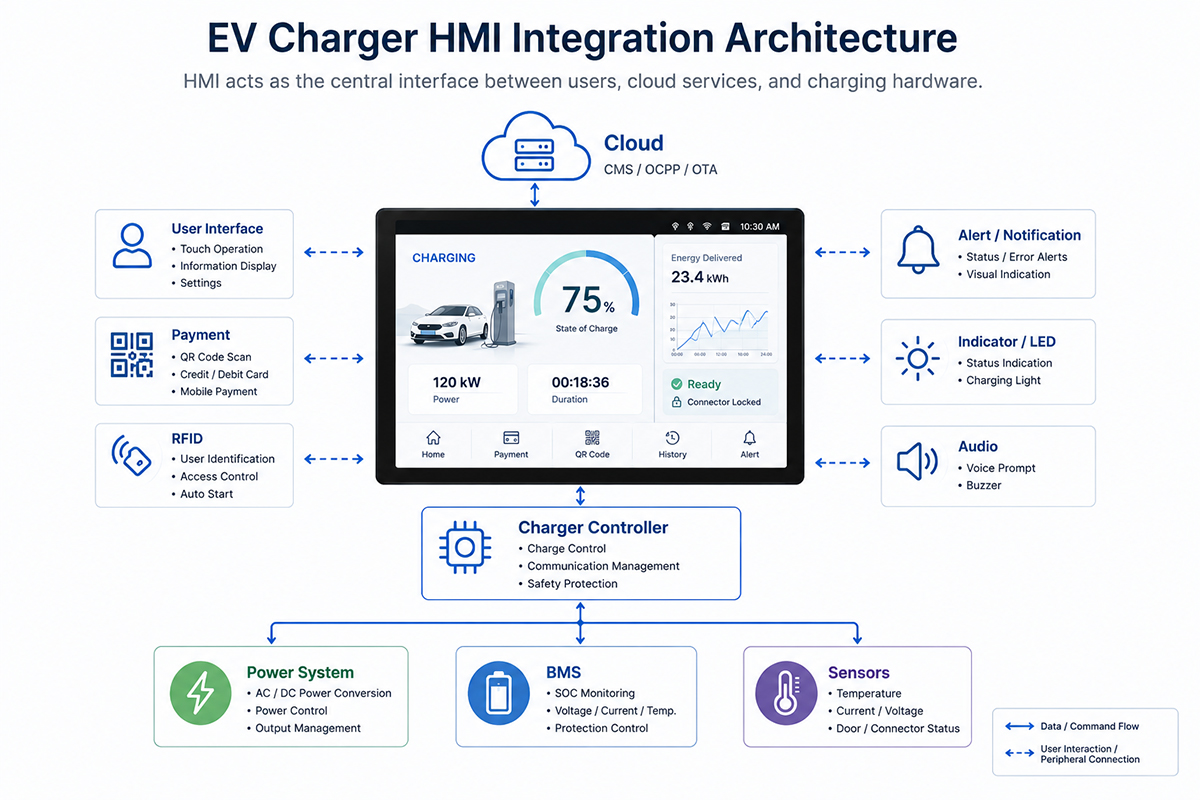
The diagram below illustrates a typical EV charger HMI architecture and the relationship between the HMI, charger controller, cloud platform, and peripheral subsystems.
Common HMI Integration Approaches
Different HMI architectures offer different advantages depending on product goals, available engineering resources, and project schedules.
| Integration Approach |
Typical Applications |
| TFT Display Module |
Suitable for systems driven by an external MCU or MPU, providing maximum flexibility for hardware design and GUI customization. Ideal for applications with dedicated software development resources or highly customized HMI requirements. |
| Smart Display |
Integrates the TFT display, touch interface, controller, and GUI platform into a single solution, reducing processor workload, simplifying system integration, and accelerating product development. |
Design Strategies for More Efficient HMI Integration
In addition to selecting the appropriate display technology, the following practices can help streamline HMI development:
- Select display interfaces that are compatible with the host processor to simplify hardware integration.
- Use mature GUI development tools and display drivers to shorten software development and debugging cycles.
- Develop a reusable HMI platform that can be shared across chargers with different display sizes or power ratings.
- Plan for future expansion by reserving resources for payment systems, membership services, remote management, and other smart features.
A successful HMI architecture is defined by more than display compatibility. By considering hardware platforms, software development, system integration, and long-term scalability together, developers can reduce development time, simplify maintenance, and build HMI platforms that are ready for future product evolution.
5. HMI Reliability and Product Lifecycle
EV chargers are designed for continuous operation over many years, making long-term reliability a critical part of HMI design. Beyond delivering a consistent display and touch experience, the HMI must withstand demanding operating environments throughout the product's lifecycle. Public charging stations are often exposed to temperature extremes, humidity, dust, direct sunlight, vibration, and frequent user interaction, all of which can affect long-term system performance. Selecting a display with proven industrial reliability helps ensure stable operation while reducing maintenance requirements over time.
Reliability extends beyond environmental durability. Developers should also consider product lifecycle planning, maintenance strategies, and long-term supply availability. Display discontinuation, component changes, or supply chain disruptions can lead to costly redesigns, extended maintenance cycles, and additional certification efforts. Choosing industrial-grade display solutions backed by long-term product availability and comprehensive technical support helps reduce development risks while lowering the total cost of ownership throughout the product lifecycle.
Key Considerations for HMI Reliability
| Design Consideration |
What to Evaluate |
| Environmental Durability |
Verify that the display can operate reliably under temperature extremes, humidity, dust, vibration, and outdoor installation conditions. |
| Continuous Operation |
Evaluate backlight lifetime, long-term operating stability, and overall display reliability to minimize maintenance requirements. |
| Industrial-Grade Quality |
Select display solutions designed for demanding industrial applications that require stable, long-term performance. |
| Long-Term Product Availability |
Consider product longevity and supply continuity to reduce redesign risks associated with end-of-life (EOL) components. |
| Maintenance Strategy |
Evaluate serviceability, module replacement, spare parts planning, and maintenance efficiency to minimize equipment downtime. |
| Platform Consistency |
Choose display platforms that support multiple sizes or product families to simplify maintenance and future product development. |
Reliability requirements vary according to installation environments, maintenance models, and product lifecycles. Rather than evaluating display specifications alone, developers should consider operating conditions, maintenance planning, and long-term supply strategies together to reduce the total cost of ownership (TCO) over the entire lifecycle of the charging system.
Design Strategies for Long-Term Reliability
To maximize product reliability while minimizing maintenance requirements, consider industrial-grade HMI solutions with the following characteristics:
- Wide Operating Temperature Range: Supports reliable operation in indoor, semi-outdoor, and outdoor installations.
- Long Backlight Lifetime: Extends maintenance intervals while reducing downtime and replacement costs.
- Industrial-Grade Quality: Delivers stable performance for continuous operation in demanding applications.
- Long-Term Product Availability: Supports long product lifecycles while reducing redesign risks caused by component obsolescence.
- Robust Mechanical Design: Improves resistance to vibration, impact, and harsh environmental conditions, making it well suited for high-use public charging stations.
Building a reliable EV charger HMI requires more than selecting a durable display. Considering environmental conditions, maintenance planning, long-term product availability, and lifecycle management together helps reduce downtime, minimize redesign costs, and create charging systems that remain dependable throughout their service life.
HMI Design Priorities for Different Types of EV Chargers
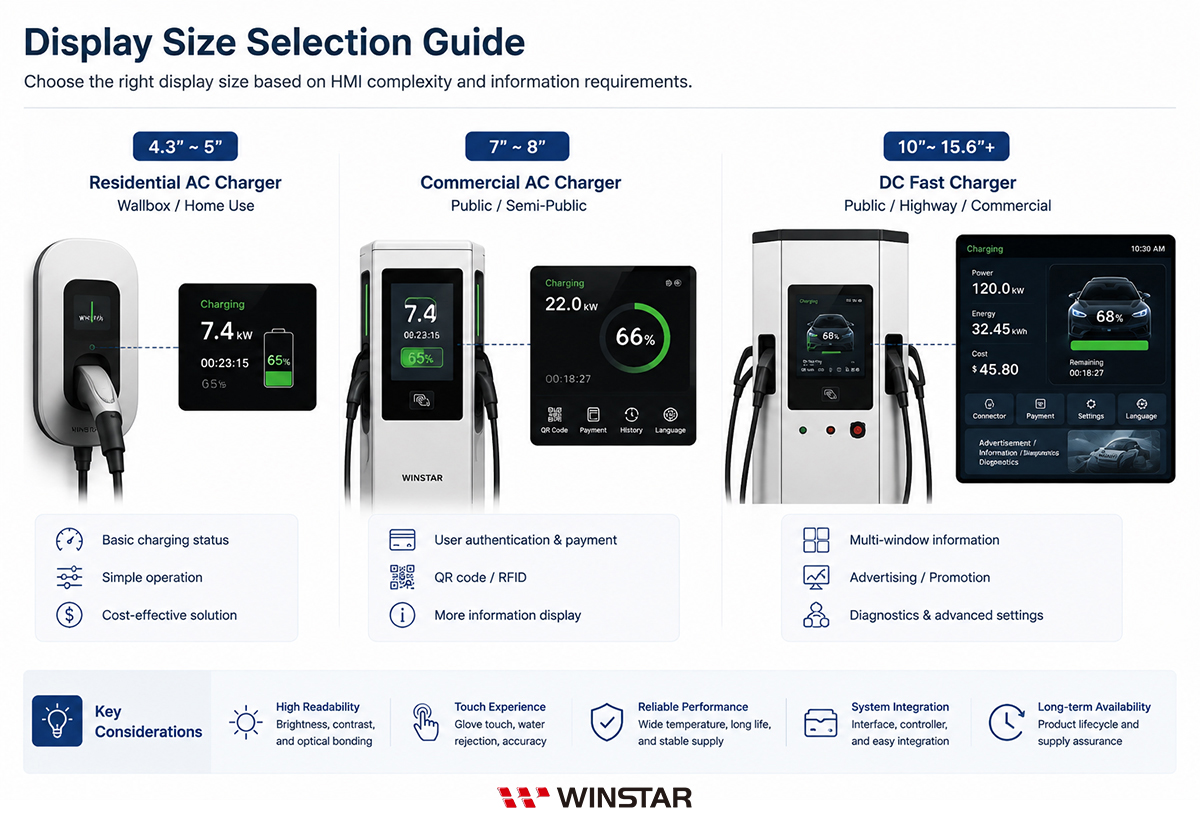
While the design principles discussed above apply to most EV charging systems, HMI requirements can vary significantly depending on the application. Residential AC chargers typically prioritize simplicity, cost efficiency, and compact product design, whereas commercial AC chargers and DC fast chargers often require support for user authentication, payment, multilingual interfaces, remote management, and more sophisticated user interactions. As functionality increases, so do the demands placed on the HMI.
For this reason, display selection should be considered alongside user workflow, UI design, system integration, and the intended operating environment. Rather than choosing a display based solely on charging power or hardware specifications, developers should design the HMI around the needs of the target application.
HMI Design Priorities by Charger Type
| Charger Type |
HMI Design Priorities |
| Residential AC Charger |
Focus on a simple user workflow, intuitive operation, compact design, and cost efficiency. Information requirements are typically straightforward, making a streamlined HMI suitable for indoor or semi-outdoor installations. |
| Commercial AC Charger |
Support features such as user authentication, payment, charging guidance, and multilingual interfaces while providing excellent outdoor visibility, responsive touch interaction, and reliable long-term operation. |
| DC Fast Charger |
Present large amounts of information simultaneously, including charging power, charging status, pricing, payment details, user guidance, and system diagnostics. These applications often benefit from larger displays, higher information density, and scalable HMI platforms capable of supporting future feature expansion. |
There is no one-size-fits-all approach to EV charger HMI design. Even chargers with the same power level may require different interface layouts, user workflows, and system architectures depending on their target market, installation environment, and intended users. The most effective HMI is one that is designed around real application requirements, balancing usability, system integration, long-term reliability, and future scalability rather than focusing on display specifications alone.
WINSTAR Display and HMI Solutions for EV Chargers
HMI requirements vary according to charger type, installation environment, system architecture, and product positioning. Selecting the right solution involves more than choosing a display size or comparing specifications. WINSTAR offers a comprehensive portfolio of TFT display modules, Smart Display solutions, and customization services covering touch integration, optical enhancements, and mechanical design. These solutions help developers build optimized HMIs for residential AC chargers, commercial AC chargers, and DC fast chargers based on their processor platform, GUI development resources, and application requirements.
Beyond supplying display hardware, WINSTAR works with customers to develop complete HMI solutions tailored to their system architecture, controller platform, and product roadmap, helping accelerate product development while simplifying system integration.
TFT Display Modules
TFT display modules are well suited for EV chargers that use an external MCU, MPU, or application processor and require full control over hardware architecture, GUI development, and system functionality. This approach offers maximum design flexibility for projects with dedicated software development resources or applications requiring highly customized user interfaces and industrial designs.
WINSTAR offers TFT display modules in a wide range of sizes, resolutions, brightness levels, display interfaces, and touch configurations to meet different HMI requirements, including:
- Standard TFT Displays: Suitable for indoor installations and environments with stable ambient lighting.
- High-Brightness TFT Displays: Designed for semi-outdoor and outdoor applications where enhanced sunlight readability is required.
- IPS Wide Viewing Angle Displays: Maintain consistent color reproduction and contrast across different installation heights and viewing angles.
- Projected Capacitive Touch (PCAP): Supports fast and intuitive touch interaction, with options including customized cover glass, glove touch, and Water Rejection.
- Optical Enhancement Options: Support Optical Bonding, Anti-Glare (AG), and Anti-Reflective (AR) technologies to improve visibility and contrast in high ambient light environments.
〉Explore TFT Display Modules
〉Explore High-Brightness TFT Displays
Smart Display Solutions
For EV chargers based on MCU platforms or projects with aggressive development schedules, WINSTAR Smart Display solutions integrate the TFT display, touch interface, controller, communication interfaces, and GUI development platform into a single HMI solution.
Rather than driving the display directly from the host controller, Smart Display solutions offload graphics rendering and touch processing, allowing the host processor to focus on charging control, payment processing, communications, and other core application functions. This architecture simplifies system integration, reduces software complexity, and helps accelerate time-to-market.
Key Benefits
- Simplified HMI Architecture: Integrates display, touch, and controller functions to reduce the graphics workload on the host processor.
- Accelerated GUI Development: Uses graphical development tools to simplify interface creation and reduce low-level display programming.
- Industrial Communication Support: Supports interfaces such as CAN, RS485, RS232, UART, and other communication options depending on system requirements.
- Custom GUI Development: Enables interfaces tailored to charging workflows, user authentication, payment systems, and operational status monitoring.
- Scalable Platform Design: Facilitates the development of a common HMI platform that can be shared across multiple charger models and display sizes.
〉Explore Smart Display Solutions
Engineering and Customization Services
In addition to standard display products, WINSTAR provides engineering services covering display integration, touch technology, optical enhancements, mechanical design, and UI/HMI development. These services help customers create integrated HMI solutions tailored to the installation environment, system architecture, and operational requirements of EV charging applications.
| Benefits |
Customer Benefits |
| Optical Bonding |
Reduces internal reflections between the display, touch panel, and cover glass to improve contrast and outdoor visibility. |
| High-Brightness and Optical Enhancements |
Combines high-brightness backlights with IPS, AG, AR, and other optical technologies to improve display performance across different lighting conditions. |
| PCAP Touch Integration |
Optimizes touch performance based on cover glass thickness, operating conditions, and application requirements, with options including glove touch and Water Rejection. |
| Mechanical Integration |
Provides customized cover glass, bezels, mounting methods, and display assembly solutions to simplify product integration. |
| Custom UI/HMI Design |
Supports interface planning and screen design based on charging workflows, information architecture, and branding requirements. |
| Technical Support |
Provides technical guidance for display interfaces, touch integration, optical design, mechanical design, and overall system integration. |
| Scalable Display Platforms |
Enables multiple charger models to share a common HMI architecture through compatible display platforms available in different sizes. |
〉 Explore PCAP Waterproof & Glove Touch Solutions
Accelerate EV Charger HMI Development with WINSTAR
Whether you are developing a residential wall-mounted AC charger, a commercial AC charging station, or a DC fast charger that requires advanced charging and payment interfaces, WINSTAR offers TFT display modules, Smart Display solutions, and engineering customization services tailored to your processor platform, installation environment, product positioning, and development schedule.
By integrating display technology, touch solutions, optical enhancements, mechanical design, and GUI development, WINSTAR helps engineering teams reduce system integration risks, shorten HMI development cycles, and build EV charger interfaces with excellent outdoor visibility, dependable operation, and long-term product availability.
〉Explore TFT Display Modules
〉Explore High-Brightness TFT Displays
〉Explore Smart Display Solutions
〉Discuss Your EV Charger HMI Project with WINSTAR
Frequently Asked Questions About EV Charger HMIs and Displays
1. How do I choose the right HMI display for an EV charger?
The best display depends on the charger type, operating environment, HMI requirements, and system architecture—not just screen size or resolution.
Residential AC chargers typically require a simple user interface with limited information, while commercial AC chargers often integrate user authentication, payment, and charging guidance. DC fast chargers usually display charging power, charging progress, pricing, payment information, and system status simultaneously, requiring larger displays and more sophisticated HMI designs.
In addition to display size, engineers should evaluate brightness, touch technology, interface compatibility, operating temperature, mechanical integration, and long-term product availability to minimize future integration challenges and redesign risks.
2. How much brightness does an outdoor EV charger need?
There is no single brightness level that suits every outdoor installation. The appropriate brightness depends on the installation environment.
Typical recommendations include:
- Indoor environments: approximately 300–500 nits
- Semi-outdoor installations: approximately 500–800 nits
- Direct sunlight: typically 1,000 nits or higher
Brightness alone does not determine outdoor readability. Cover glass design, display reflectance, contrast ratio, viewing angle, and optical technologies such as Anti-Glare (AG), Anti-Reflective (AR), and Optical Bonding all contribute to overall visibility. Final display selection should always be validated under actual installation conditions.
3. Which display technologies improve outdoor visibility?
Outdoor readability is achieved through a combination of display and optical technologies rather than a single feature. High-brightness backlights, IPS panels, Anti-Glare (AG), Anti-Reflective (AR), and Optical Bonding each address different visibility challenges.
If only one optical enhancement can be prioritized, Optical Bonding is often the preferred choice. By eliminating the air gap between the display, touch panel, and cover glass, it reduces internal reflections, improves contrast, enhances sunlight readability, and helps minimize condensation caused by temperature changes.
4. Should I choose a standard TFT display or a Smart Display?
A standard TFT display is generally the better choice when the system already includes an MCU or MPU and the development team plans to design its own GUI and software architecture.
Smart Display solutions are better suited for projects that aim to shorten HMI development time, reduce software complexity, or accelerate time-to-market. By integrating the display, touch controller, and GUI platform into a single solution, Smart Display reduces the workload of the host processor and simplifies system integration.
The best choice depends on available engineering resources, project schedules, and product requirements rather than hardware specifications alone.
5. Should I use a TFT LCD or an OLED display for an EV charger?
Both TFT LCD and OLED offer different advantages, and the most suitable display technology depends on the application's requirements and operating environment.
Today, TFT LCD remains the most widely adopted display technology for industrial EV chargers due to its proven performance in continuous operation, long-term product availability, system integration, and overall cost efficiency.
OLED offers excellent contrast, self-emissive imaging, and fast response times, making it a strong option for certain HMI applications. However, for EV chargers that require continuous operation, static user interfaces, and long product life cycles, TFT LCD continues to be the more commonly adopted solution in the market.
Ultimately, the choice should be based on product positioning, installation environment, expected service life, and overall system requirements rather than a comparison of individual display specifications alone.
6. How can I reduce the risk of future redesigns?
Because EV chargers are long-lifecycle products, selecting industrial-grade displays with long-term product availability, stable specifications, Product Change Notification (PCN) support, and comprehensive technical assistance helps minimize future redesign risks.
During product development, engineers should also validate performance under temperature extremes, sunlight exposure, vibration, humidity, ESD, and continuous operation while verifying display interfaces, touch performance, backlight lifetime, and mechanical compatibility.
Building a common HMI platform and selecting display families that offer multiple sizes, brightness levels, and interface options can further reduce maintenance costs, simplify product upgrades, and improve long-term lifecycle management.